
Know your EV, from the battery up.
Your dash shows a few numbers, then forgets them. BEV Monitor reads the car itself and keeps every trip and every charge, so you can see where your range goes and what each charge really costs.
Coming soon · now in beta on TestFlight
What is BEV Monitor?
BEV Monitor is an iPhone app that records every trip and every charge, and shows them as clear numbers on your iPhone and in CarPlay: efficiency, cost, battery health and more. It gets its data from the car itself, through a small Bluetooth adapter that plugs into the diagnostic port under the dash. There's no account and no cloud.
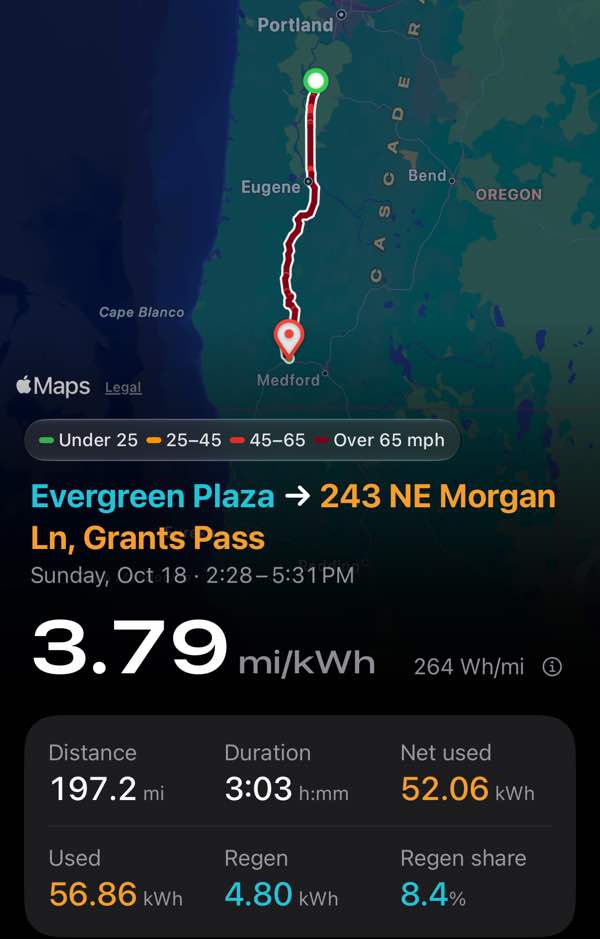
Every trip, in detail
See the route, the distance, the energy used, your efficiency, and what the battery got back from regen. The map colors the route by your speed.
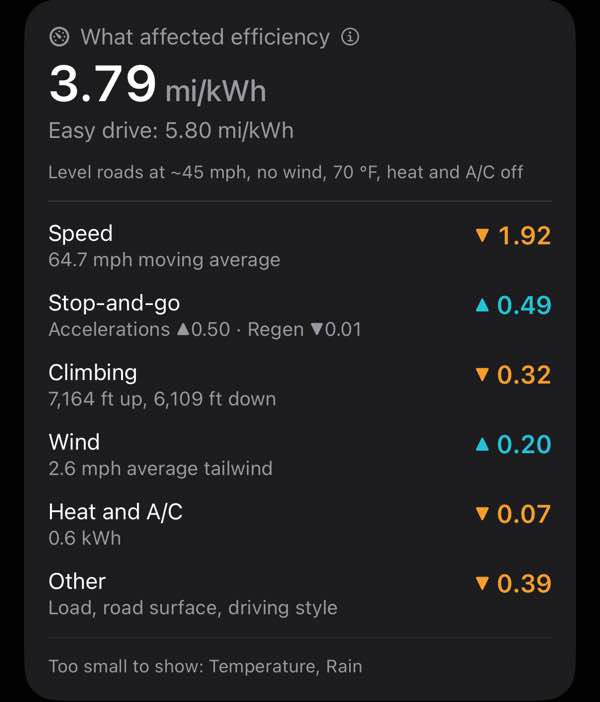
Why a trip used more
Each trip is compared with an easy drive and shows what moved its efficiency: speed, stop-and-go, the climb, wind, and heat or A/C. Wind comes from Apple Weather along your route. On this highway trip, speed cost the most.
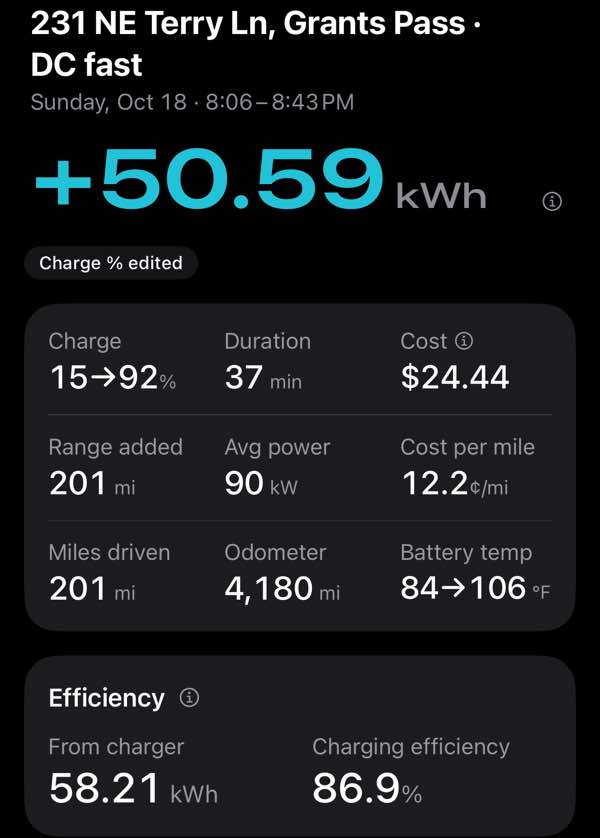
The real price of every charge
See the energy added, how long it took, what it cost at your rate and per mile, and how much of the charger's energy reached the battery. At home, cost counts what came out of the wall, so charging losses are already in it.
Watch it charge, live in CarPlay
Plug in and CarPlay switches to a live charging curve: the power going in at each charge level, with the time to 80% beside it. At a fast charger, you can see right away whether you're getting full speed and when the curve slows down.
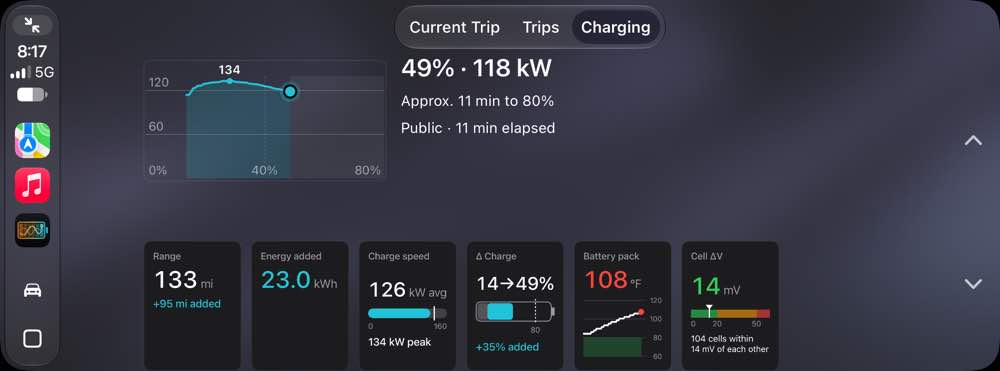
CarPlay also tracks the trip you're on and lists your recent trips and charges. You can watch the same live charge on your iPhone, too, and the trip or charge in progress stays on its Lock Screen.
Your battery, inside and out
See battery health as the car reports it, how evenly the cells hold their charge, pack temperatures, and how deep you usually charge.
Plan with A Better Routeplanner
If you want, BEV Monitor can send your live charge level to ABRP so it plans from the real number, not a guess.
Your privacy by design
- Everything stays on your iPhone
- No account, no password
- No ads, no analytics, no tracking
- Nobody at BEV Monitor can see your trips
What BEV Monitor doesn't do
- Make you create an account
- Send your trips and charges to a server
- Send your car commands. It only reads.
- Need a connected-services subscription
- Score you or judge how you drive
Your data stays on your iPhone and in your own iCloud backup. Apple Maps names the places you drive, and Apple Weather gets rough locations for the forecast and the wind. ABRP gets live data only if you turn it on. We get anonymous usage counts and your dash readings, unless you turn them off. The details are in the privacy policy.
How it works
- Get a Bluetooth Low Energy (BLE) OBD2 adapter. It's a small adapter that plugs into the port under the dash. Look for "BLE" or "works with iPhone" on the box.
- Install BEV Monitor. It's in beta on TestFlight now. Email us to join.
- Connect, then drive. Pick your model, connect to the adapter, and go. A Shortcuts automation can connect for you when CarPlay starts.
Common questions
Which cars work?
2026 and later Subaru Uncharted, Solterra and Trailseeker, and Toyota C-HR, bZ and bZ Woodland. The first beta round is for the 74.7 kWh battery.
Which OBD2 adapter?
BEV Monitor was built and tested with the OBDLink CX, so it's the safest pick. LELink, and the BLE versions of Veepeak and Vgate iCar Pro, work too. iPhones can use only BLE adapters, so adapters made only for Android won't connect. Have a different one? The app can test it and send us the result.
Can BEV Monitor change anything in my car?
No. It only reads the car's data and never sends it commands.
Do I need the Subaru or Toyota app, or a data plan?
No. Everything comes through the adapter, so it works without a connected-services subscription.
Where does my data go?
To your iPhone and your own iCloud backup. We see only anonymous usage counts and your dash readings (you can turn both off), and anything you choose to send. See the privacy policy.
Is BEV Monitor affiliated with Subaru or Toyota?
No. It's an independent app. The brands are named only to say which cars it works with.